
Cluster Topology
The Cluster Topology view provides an interactive list of your Valkey cluster’s nodes, showing replication relationships and connection status at a glance.
Overview
Section titled “Overview”Understand your cluster architecture with a structured node list that groups each primary with its replica, giving you a clear picture of your replication layout.
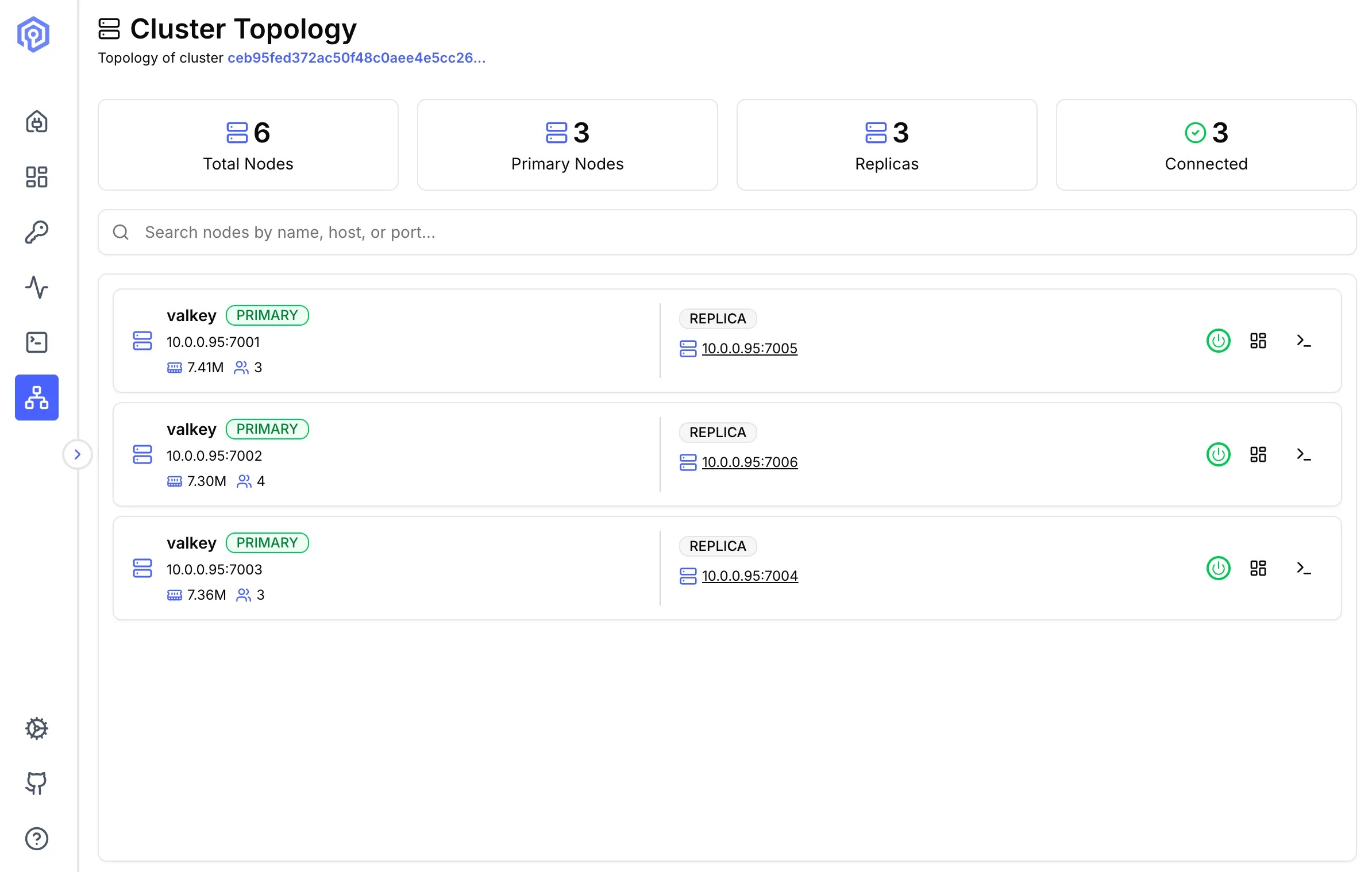
Cluster Statistics
Section titled “Cluster Statistics”At the top of the page, four summary cards display key cluster metrics:
- Total Nodes: Total number of nodes in the cluster (primaries + replicas)
- Primary Nodes: Count of primary nodes
- Replicas: Count of replica nodes
- Connected: Number of nodes currently connected and reachable
Node List
Section titled “Node List”Layout
Section titled “Layout”Nodes are displayed in a paired row layout. Each row groups a primary node on the left with its associated replicas on the right.
Node Display
Section titled “Node Display”Each node card shows:
- Name: The Valkey instance name (e.g.
valkey) - Role Badge:
PRIMARYorREPLICA - Address: Host and port (e.g.
10.0.0.95:7001) - Memory: Memory usage reported by
used_memory_human(e.g.3.60M) - Connected Clients: Number of currently connected clients
Searching Nodes
Section titled “Searching Nodes”Use the search bar to filter nodes by name, host, or port.
Node Actions
Section titled “Node Actions”Each node row includes action icons on the right side:
- Power: Connect to the primary node
- Dashboard: Go to dashboard of the node
- Terminal: Open the Send Command interface for the node
Replication Structure
Section titled “Replication Structure”Each row pairs a primary with its replica:
Primary: 10.0.0.95:7001 → Replica: 10.0.0.95:7005Primary: 10.0.0.95:7002 → Replica: 10.0.0.95:7006Primary: 10.0.0.95:7003 → Replica: 10.0.0.95:7004Clicking on a replica’s address link navigates to that node’s detail view.
Next Steps
Section titled “Next Steps”- Monitor cluster performance on the Dashboard
- Track operations with Activity
- Execute cluster commands in the Send Command