
Key Browser
The Key Browser provides a powerful interface for exploring and managing keys stored in your Valkey cluster.
Overview
Section titled “Overview”Navigate through your keyspace with an intuitive interface that supports filtering, searching, and adding.
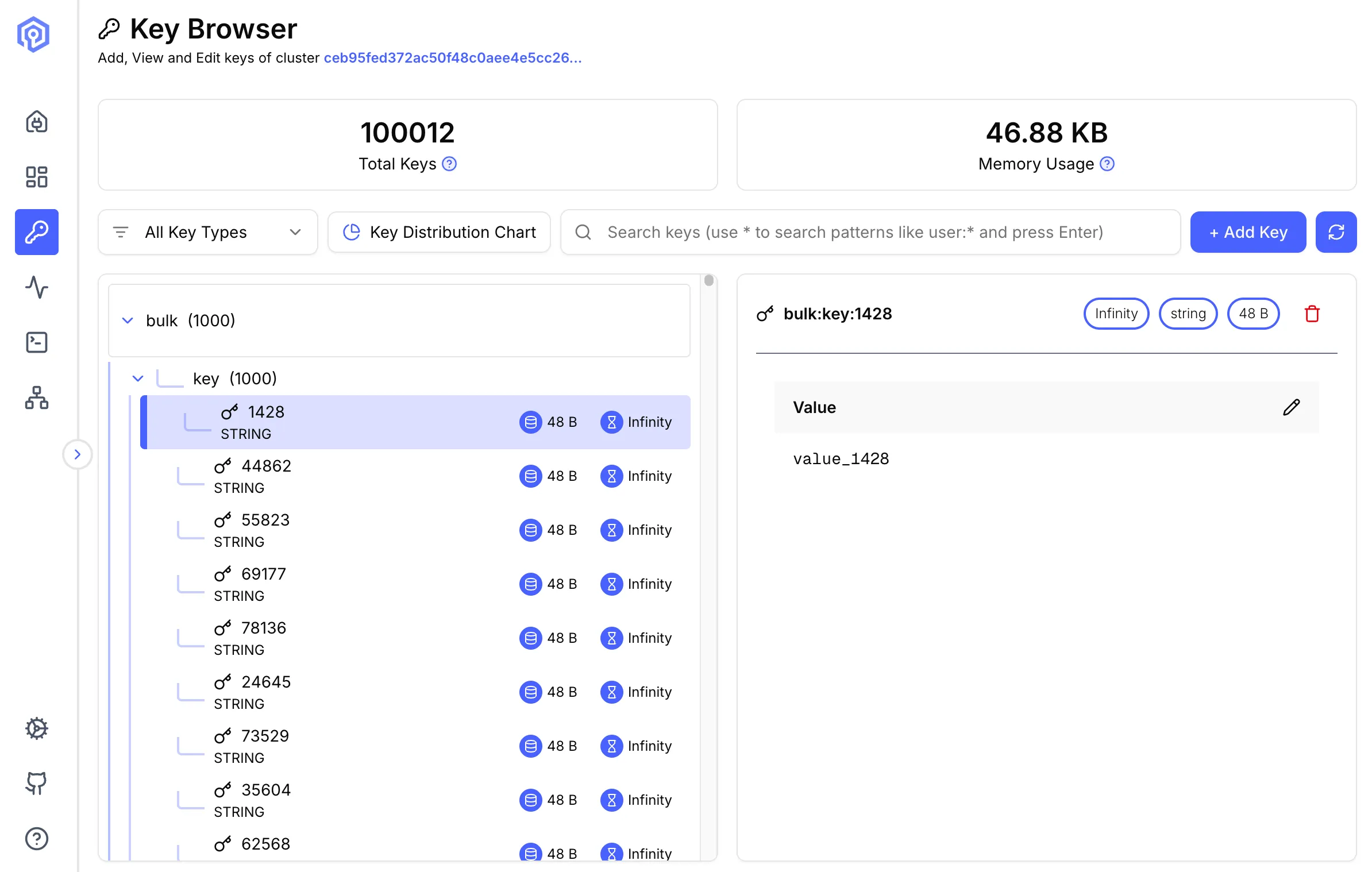
Key Features
Section titled “Key Features”Browsing Keys
Section titled “Browsing Keys”- Tree View: Navigate keys organized by namespace separators (
:) - Pagination: Handle large keyspaces efficiently
Search and Filter
Section titled “Search and Filter”Pattern Matching
Section titled “Pattern Matching”Use Redis/Valkey pattern matching syntax:
user:* # All keys starting with "user:"*:session # All keys ending with ":session"user:*:cache # Keys matching the patternType Filtering
Section titled “Type Filtering”Filter keys by data type:
- String: Simple key-value pairs
- Hash: Field-value maps
- List: Ordered collections
- Set: Unordered unique collections
- Sorted Set: Scored, ordered sets
- Stream: Append-only logs
- JSON: ReJSON-style document values (requires the JSON module)
Key Operations
Section titled “Key Operations”Viewing Keys
Section titled “Viewing Keys”String Values
Section titled “String Values”View string values with syntax highlighting for JSON, XML, and other formats.
Hash Fields
Section titled “Hash Fields”Display fields and values in a paginated table format.
List Elements
Section titled “List Elements”Browse list elements with pagination.
Set Members
Section titled “Set Members”View members of a set with pagination.
Sorted Set Entries
Section titled “Sorted Set Entries”Display entries with their scores, paginated for large collections.
All collection types (hash, list, set, sorted set) use pagination to handle large data structures efficiently. Only a page of elements is loaded at a time, preventing the browser from blocking on keys with millions of members.
Editing Keys
Section titled “Editing Keys”- Update Value: Modify existing key values
- Add Fields: Insert new hash fields or list elements
Key Details Panel
Section titled “Key Details Panel”Click any key to view detailed information:
- Name: Key Name
- Type: Data structure type
- Size: Actual size in bytes
- TTL: Time to live (if set)
Value Viewer
Section titled “Value Viewer”- Raw View: Display raw value for String types
- Table View: Hash, List, Set, Stream, and Zset types
- Json View: JSON data
Switching Databases
Section titled “Switching Databases”Each (host, port, db) triple maps to its own client connection on the server, so the Key Browser is always scoped to the database you connected to. Switching to a different db opens a new client side-by-side with the existing one rather than issuing SELECT against an existing client, so operations like KEYS, SET, and DEL against one database never affect keys in another database on the same node. For cluster connections this only applies when the Valkey server is at version 9.0.0 or higher; earlier cluster servers always operate on db 0 and a non-zero db is rejected at connect time.
Next Steps
Section titled “Next Steps”- Execute commands with the Send Command interface
- Monitor key access with Activity
- Visualize data distribution in Cluster Topology